Automation is attractive when a process is slow, frustrating, or expensive. It offers a visible action: connect the tools, add a model, remove the manual step.
But friction does not always mean a workflow is ready for automation. Sometimes the work is difficult because nobody owns the decision, the information is unreliable, the policy is unclear, or the task depends on empathy and accountability.
The responsible choice may be to simplify the process, improve the source data, support the person making the decision, or leave the work human-led. Knowing when not to automate protects the team from making a fragile process faster.
1. The process changes every time
Automation needs some stability. The workflow does not have to be perfect, but the team should be able to describe its trigger, routine path, major decisions, and expected result.
If every person follows a different method, the rules change weekly, or nobody can agree what “complete” means, software will encode one version of a disagreement. That can make the inconsistency harder to see and more expensive to change.
A better next step: Map several recent cases with the people who handled them. Separate legitimate variation from habit. Agree on ownership and a minimum standard before automating.
2. The step should be removed
Some manual work exists because an old system, approval, or report once required it. The business may be preparing information that nobody reads, copying data into a retired process, or seeking approval for a decision already governed by a clear limit.
Automating the step preserves its cost and complexity. It can also make the unnecessary work look permanent.
A better next step: Ask who uses the output, what decision it supports, and what would happen if the step stopped for a month. Remove, combine, or reduce it before considering a tool.
3. The input cannot be trusted
An automated workflow depends on its inputs. Missing identifiers, inconsistent names, duplicate records, outdated instructions, and free-text workarounds can create failures that look like a problem with the automation.
AI may tolerate variation better than fixed rules, but it does not turn unreliable information into verified fact. A confident interpretation of a bad source is still a bad result.
A better next step: Define required fields, assign ownership for source data, remove avoidable duplication, and measure input quality. Route incomplete or conflicting cases to a person.
4. An error could cause serious harm before anyone notices
Be cautious when a workflow affects employment, legal rights, safety, health, credit, access to essential services, financial controls, or other consequential outcomes. The issue is not only whether the technology is accurate on average. It is whether a specific failure can be detected, challenged, and corrected in time.
If the business cannot explain the decision, provide a meaningful appeal, or restore the person affected, full automation is a poor fit.
A better next step: Keep the consequential decision human-led. Use automation for bounded support, such as organizing evidence, checking completeness, or preparing a draft. Seek qualified legal, compliance, privacy, or domain review where required.
5. The value comes from human connection
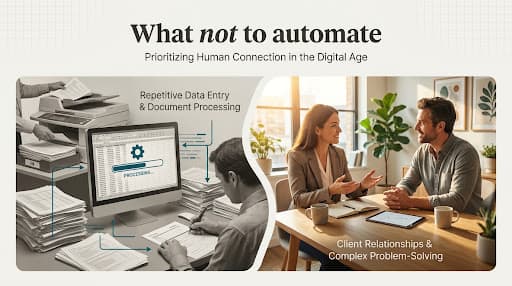
Some work is valuable because a person listens, notices context, negotiates, reassures, or takes responsibility. A sensitive complaint, difficult performance conversation, nuanced sales discovery, or response to someone in distress may involve information that is not captured in a form.
Automation can help prepare the person, collect routine details, schedule the conversation, or document agreed actions. It should not pretend that fluent text is the same as care or accountability.
A better next step: Automate the administration around the interaction. Keep the conversation and judgment with a person who has the authority and skill to respond.
6. Nobody owns the result
A workflow can cross several systems and departments while belonging to no one. When it fails, each team sees only its part. Automation then creates a new system without creating accountability.
An implementation owner is not enough. Someone in the business must own the outcome, decide how exceptions are handled, approve changes, and make sure the workflow continues to serve its purpose.
A better next step: Name the process owner, define service expectations, assign exception routes, and document who can pause the workflow. If ownership cannot be agreed, resolve that before building.
7. The business cannot monitor or recover it
Every automated workflow will eventually encounter a failed connection, changed input, expired permission, unusual case, or rule that no longer fits. If the team cannot see failures, identify affected records, continue urgent work, and restore service, the automation introduces hidden operational risk.
This is especially important when AI is involved. Model behavior, provider services, prompts, connected sources, and incoming work can change. A successful launch test is not permanent evidence.
A better next step: Design logging, alerts, exception queues, manual fallback, and recovery ownership before launch. If the required control costs more than the problem is worth, do not automate the workflow.
Use a three-part decision
Instead of asking only “Can this be automated?”, ask three questions.
Should we do this work?
Confirm that the step supports a current business need. Remove duplicate, obsolete, and low-value work.
Is the work ready?
Check for stable rules, suitable data, clear ownership, understood exceptions, and an observable result. Repair the process where those foundations are missing.
What level of assistance fits?
Choose among process change, a standard tool feature, rule-based automation, AI-supported work, or a human-led process with better information. Full automation is only one option.
This sequence keeps the problem in view. It also creates more honest choices than starting with a product and searching for somewhere to install it.
A stoplight check
Green signals: frequent work, stable rules, reliable inputs, low or recoverable consequences, clear ownership, and measurable outcomes.
Yellow signals: meaningful exceptions, variable documents, moderate consequences, incomplete data, or a need for interpretation. These call for a narrower scope, testing, and stronger human review.
Red signals: unresolved policy, disputed ownership, serious hard-to-reverse consequences, no monitoring, no fallback, or a task where human relationship and accountability are the work.
A red signal does not always prohibit every use of technology. It changes the role technology should play. Support the person, improve the evidence, or automate only the safe administrative edge.
What to take away
Good automation decisions include the option not to automate. Remove needless work, repair unstable processes, and keep consequential or deeply human decisions with accountable people.
When automation does fit, start with a bounded task that the team can explain, observe, and recover. Choosing less technology can be the decision that gives people the most useful time back.
Test the fit before choosing the tool
Bring one frustrating workflow. We will help you identify what to remove, repair, support, or automate.